- PDF menus are often cumbersome on smartphones and quickly outdated.
- A web menu makes categories, dishes and prices directly readable and linkable.
- Changes must be possible without a new file and without technical access.
- QR codes offer another way to open the menu; guests should also find it through your website and search.
A PDF is convenient in the office: export, upload, done. For guests, it can mean zooming, scrolling and losing their place. On a phone, a beautifully designed printed menu can quickly become frustrating.
An online menu puts guests first. It is easy to read on mobile, straightforward to update and gives both people and search engines a clearer understanding of your food.
Why PDFs cause problems in everyday restaurant life
A PDF has fixed page dimensions. On the smartphone, the font is small, multi-column layout forces you to move horizontally and large files load slowly. Some guests will need to download the file additionally or lose their place when they go back.
Keeping a PDF current is another challenge. Even after replacing it, old links, search results and cached copies may remain. When prices change or dishes sell out, guests can arrive with the wrong expectations.
What makes a real web menu better
- Font and spacing adapt to the display
- Jump straight to a category
- Dishes, descriptions and prices are searchable
- Update individual offers immediately
- Links lead directly to breakfast, lunch menu or drinks
- Assistive technologies can access the content more easily
A good online menu should not feel like an admin system. Guests see a calm, on-brand presentation while your team uses simple fields behind the scenes.
The same dish: print layout and mobile web menu
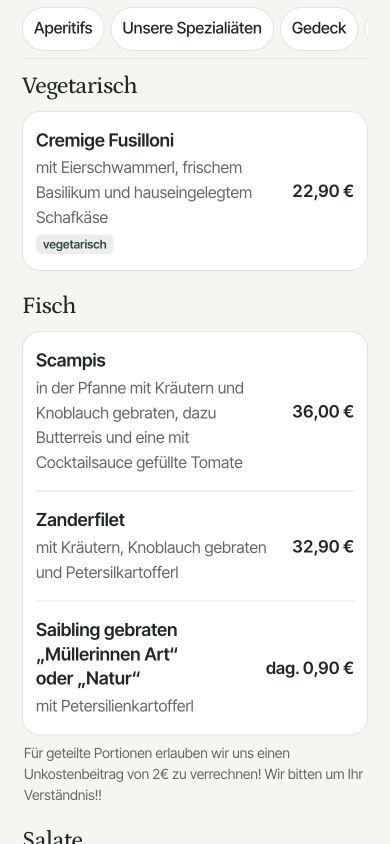
The dish ‘Cremige Fusilloni’ makes the difference tangible. The web view below is a real capture from Landgasthof Schickh. The print-layout column is a comparison scenario; this comparison does not use an original PDF menu from the restaurant.
| Information | In a fixed A4 print layout | In the web menu shown |
|---|---|---|
| Dish and description | Text shrinks with the whole page; depending on the layout, guests may need to zoom. | Name and description appear in a dedicated, narrow card. |
| Price €22.90 | Readability depends on font size and page width. | The price is directly associated with the dish. |
| Vegetarian options | Labels and the key depend on the document. | The dish is visibly labelled ‘vegetarian’. |
| New prices | Edit, export and replace the PDF. | Open the dish in the editor, change the price and save. |
A well-made PDF can be searchable and accessible. Google can also index text-based PDFs (Source: Google Search Central). The main advantages of a good web menu are its mobile presentation and maintenance; it does not guarantee higher rankings.
Your dishes help guests find you
When dishes are on one page as text, they provide context to cuisine and offer. A guest looking for "Kaspressknödel in Salzburg" or "vegan lunch menu Graz" may come across a suitable page rather than a picture without readable content.
Avoid stuffing descriptions with search terms. Write as your team would explain a dish: the main ingredient, how it is prepared and one or two key accompaniments.
Update prices, seasonal dishes and availability faster
Agree who records changes before service. That person should be able to update prices, descriptions and availability without an agency or a file export. Mark or hide sold-out dishes before guests order them.
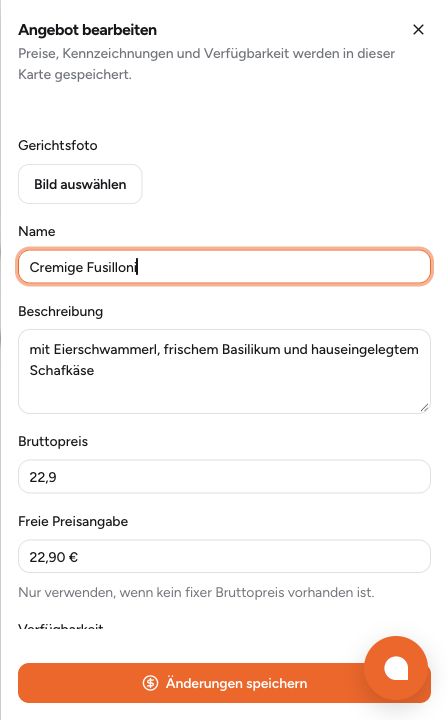
How to check a price change: Open the dish, update the gross price and save. Then reopen the public menu and check the price and description. Existing QR codes remain usable as long as they point to the same menu address.
Using the QR code correctly at the table
A QR code complements a printed menu, a daily recommendation or your team’s explanation. Give it enough contrast and space, and add a clear label such as “Open the current menu”. Test it on several phones in typical dining-room lighting.
Do not point the QR code at a file that changes with every update. Use a permanent web address so it stays valid when the menu changes.
From PDF to online menu in five steps
- Categories, dishes, prices and allergens from your current menu.
- Shorten descriptions and arrange them for mobile use.
- Set a permanent web address.
- Clarify responsibility and approval process in the team.
- Redirect old PDF links to the new menu and test your QR codes.
You can still offer a printable PDF. Make the mobile-friendly online menu your reliable main source.
When is a PDF enough, and when is a web menu worthwhile?
A PDF can remain useful as an additional print version, especially when changes are rare. A mobile web menu is particularly worthwhile when prices and seasonal dishes change often, or when many guests visit on smartphones. Before switching, check the initial data-entry effort, how allergens are displayed, extra costs and responsibility for future updates.
The digital menu decision guide shows you what to look for when choosing a solution.